01 / CAPACITY
Ease the administrative load.
Bring records, responsibilities and supporting evidence into organised workflows, so teams can spend less time piecing together what needs to happen next.
Certainty for the work that matters
Connect strategy, risk, compliance and service delivery—so less effort goes into administration and more goes into outcomes.
Purpose-led tools. Evidence-informed decisions.
Built around service organisations
The benefit
Every hour spent finding information, following up actions or assembling evidence draws on the resources that deliver services. Certai gives that work a clearer structure.
01 / CAPACITY
Bring records, responsibilities and supporting evidence into organised workflows, so teams can spend less time piecing together what needs to happen next.
02 / CONFIDENCE
Connect what an organisation is trying to achieve with its risks, controls and actions. Give leaders a clearer basis for prioritising effort and asking the right questions.
03 / SERVICE
Keep attention on the people, services and resources that matter. Use assessment, assurance and incident learning to guide practical improvements.
How Certai works
Certai is powered by Sentric’s Certainty-Based Governance, Risk and Compliance methodology. It helps teams examine what supports an outcome, where confidence is weak and what to do about it.
01
Identify the outcomes, services and obligations you need to protect.
02
Connect the risks, controls, responsibilities and actions around those outcomes.
03
Assess how people work and how well the organisation supports them.
04
Assign improvements, review progress and bring learning back into decisions.
BACKS
Look at people, culture and the evidenced operating state. A documented requirement is a starting point; confidence also depends on how it is understood and put into practice.
GPPT
Examine the structure an organisation provides. Clear accountabilities, useful requirements, practical workflows and supporting tools help make the right action repeatable.
In CBGRC, these dimensions inform assessment at the risk level. Controls and evidence support that assessment; the result helps prioritise action and review as conditions change.
Connected tools
Three connected areas of work, each with a clear purpose. Choose the tools and workflows that fit your organisation.
CBGRC
Strategy · Risk · Assurance
Connect risk, controls, evidence and business outcomes with Certainty-Based Governance, Risk and Compliance.
CMS
Clients · Cases · Services
Bring client information and service delivery together in the Client Management System.
IMS
Incidents · Response · Learning
Manage incidents from first report through investigation and corrective action in connected workspaces.
IMS is available within connected CBGRC and CMS workspaces. Your organisation’s configuration, permissions and licensed features determine which workflows you can use.
Who it serves
Bring service delivery and responsible oversight into the same conversation.
Connect referrals, intake, service episodes and tenancy support with organisational oversight.
Bring client support, care plans, consent and follow-up work into a clearer operating picture.
Discuss the client, service and governance workflows that suit the way your organisation works.
Confirm specialist workflow needs and readiness with us before choosing a deployment.
Product evidence
Real CBGRC interface captures show how risk context and assurance work are organised. These examples are from earlier test builds; screens and terminology vary by version.
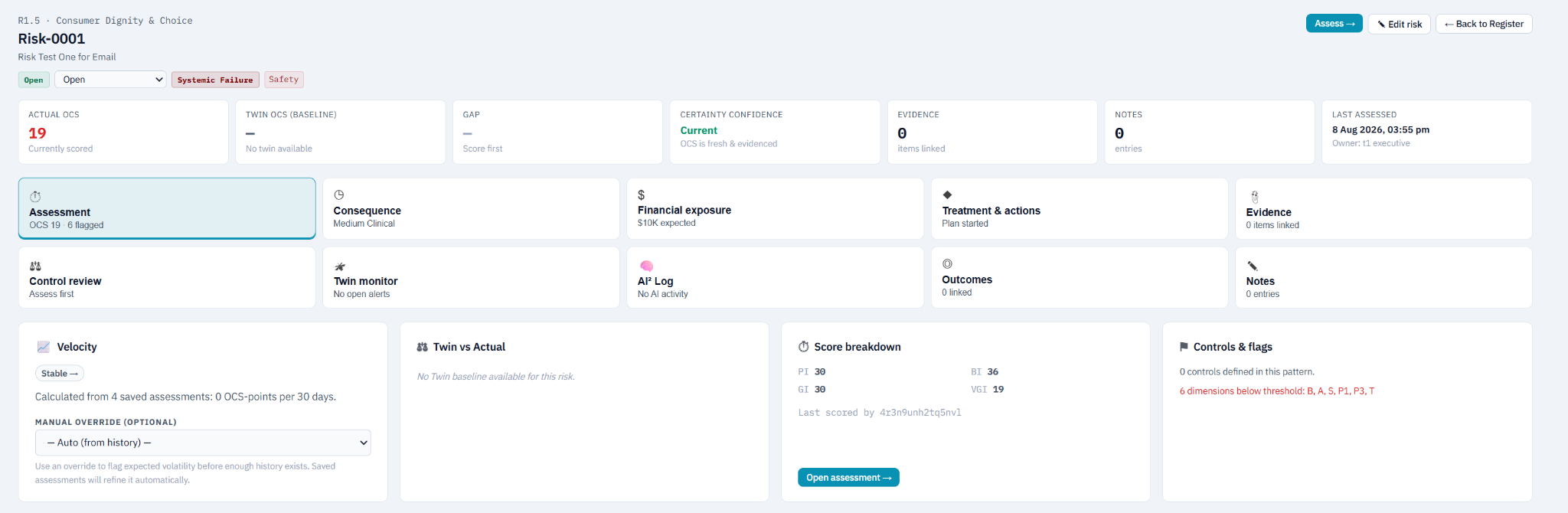
CBGRC interface — example record from an earlier test build. The displayed values illustrate the screen, not a customer result.
From requirement to follow-up
Keep control applicability, related risks and review status together, so teams can see the work in front of them and follow it through.
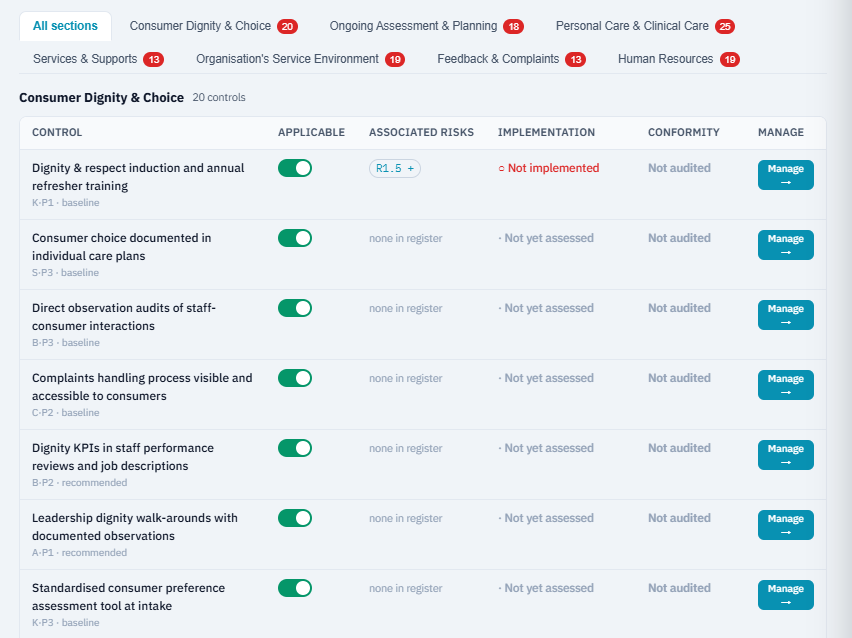
CBGRC interface — example control records from an earlier test build. Screens and terminology vary by version.
Start a conversation
See how Certai could fit your organisation. Request a demonstration or discuss a managed service with Sentric.
Opens your email application · hello@sentric.com.au
Existing customers
Choose your product, then sign in with your existing organisation account. Your company code identifies the workspace; your permissions and licensed features determine your access.
Welcome back
Open your product and sign in with your company code and organisation account.
Strategy, risk, assurance and outcomes.
Open CBGRCClients, cases and day-to-day service delivery.
Open CMSIncident reporting, response, investigation and learning.
Open CBGRC or CMS above, sign in, then choose Incidents. Access depends on your organisation’s configuration, permissions and licensed features.
Need your company code or a change to your access? Contact your organisation’s workspace administrator.